Extension Settings
You can configure the extension behavior through Visual Studio Code settings. To access the settings:
- Open the Command Palette (
Ctrl+Shift+P/Cmd+Shift+P) - Type “Settings: Open Settings (UI)”
- Search for “Mise”
You can also click on the mise extension indicator in the status bar to quickly access the extension settings.
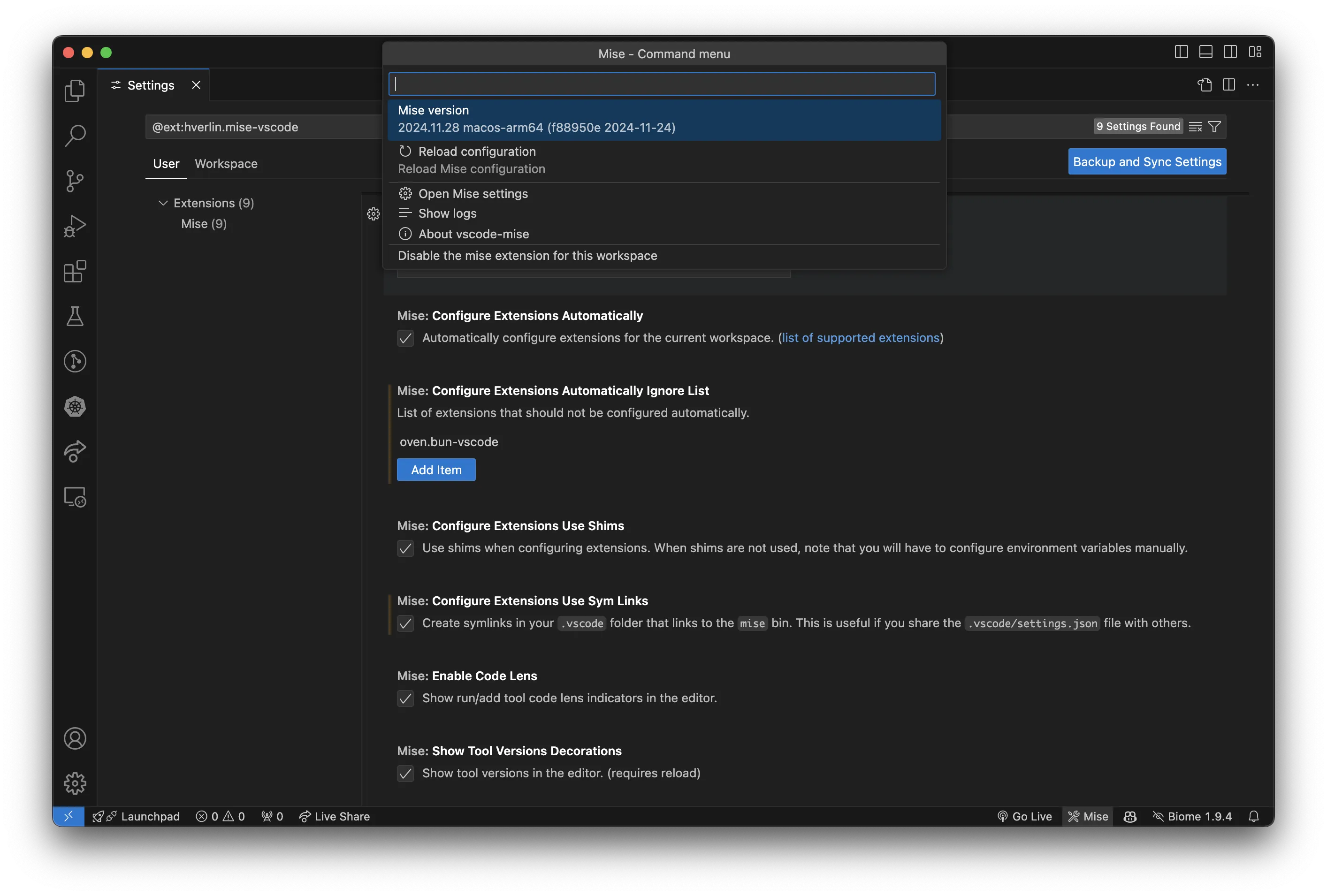
Settings
Section titled “Settings”mise.skipWorkspaceBinaryApproval
Section titled “mise.skipWorkspaceBinaryApproval”- Type:
boolean - Default:
false
Run a mise binary located inside the workspace without asking for approval first.
This turns off a security check. A repository can point mise.binPath at a program it ships, and with this enabled that program runs as soon as you open the project. Useful if you rely on a committed launcher such as the one written by mise generate bootstrap -l -w.
You still have to trust the folder in VS Code first: the extension does not run in an untrusted workspace at all. This setting is machine-scoped, so a project cannot enable it for you.
mise.enable
Section titled “mise.enable”- Type:
boolean - Default:
true
Enable/disable mise extension.
mise.binPath
Section titled “mise.binPath”- Type:
string - Default:
"mise"
Path to the mise binary (automatically detected on startup).
If set to mise (default), it will use mise available in PATH.
Relative paths (e.g. ./bin/mise) and ${workspaceFolder} variables are resolved against the workspace folders.
See https://mise.jdx.dev/getting-started.html to install mise.
mise.miseEnv
Section titled “mise.miseEnv”- Type:
stringMise environment to use. (https://mise.jdx.dev/configuration/environments.html)
mise.configureExtensionsAutomatically
Section titled “mise.configureExtensionsAutomatically”- Type:
boolean - Default:
false
Automatically configure extensions for the current workspace. (list of supported extensions).
This will modify your workspace settings (.vscode/settings.json). You can use the ignore/include lists settings to customize which extensions are configured.
When mise.configureExtensionsUseShims is enabled, this also runs mise reshim on startup.
mise.configureExtensionsAutomaticallyIgnoreList
Section titled “mise.configureExtensionsAutomaticallyIgnoreList”- Type:
array(array ofstring) - Default:
[]
List of extensions that should not be configured automatically.
Available options:
ms-python.pythondenoland.vscode-denocharliermarsh.ruffgolang.gooven.bun-vscodeoracle.oracle-javaredhat.javavscjava.vscode-gradlesalesforce.salesforcedx-vscode-apextimonwong.shellcheckms-vscode.js-debugvscode.php-language-featuresxdebug.php-debugjulialang.language-juliapgourlain.erlangDart-Code.dart-codedart-code.flutterziglang.vscode-zigsignageos.signageos-vscode-sopsjoselitofilho.ginkgotestexplorerbufbuild.vscode-bufbiomejs.biomeoxc.oxc-vscodebazelbuild.vscode-bazelswiftlang.swift-vscodePkl.pkl-vscodeexiasr.hadolintastral-sh.tyfoxundermoon.shell-formatsumneko.luatwxs.cmakems-dotnettools.vscode-dotnet-runtimeSonarSource.sonarlint-vscode
mise.configureExtensionsAutomaticallyIncludeList
Section titled “mise.configureExtensionsAutomaticallyIncludeList”- Type:
array(array ofstring) - Default:
[]
List of extensions that should be configured automatically. If both include and ignore lists are set, the ignore list takes precedence. If the include list includes ‘all’ (default), all supported extensions are considered except those in the ignore list.
Available options:
allms-python.pythondenoland.vscode-denocharliermarsh.ruffgolang.gooven.bun-vscodeoracle.oracle-javaredhat.javavscjava.vscode-gradlesalesforce.salesforcedx-vscode-apextimonwong.shellcheckms-vscode.js-debugvscode.php-language-featuresxdebug.php-debugjulialang.language-juliapgourlain.erlangDart-Code.dart-codedart-code.flutterziglang.vscode-zigsignageos.signageos-vscode-sopsjoselitofilho.ginkgotestexplorerbufbuild.vscode-bufbiomejs.biomeoxc.oxc-vscodebazelbuild.vscode-bazelswiftlang.swift-vscodePkl.pkl-vscodeexiasr.hadolintastral-sh.tyfoxundermoon.shell-formatsumneko.luatwxs.cmakems-dotnettools.vscode-dotnet-runtimeSonarSource.sonarlint-vscode
mise.configureExtensionsUseShims
Section titled “mise.configureExtensionsUseShims”- Type:
boolean - Default:
true
Use shims when configuring extensions. When shims are not used, note that you will have to configure environment variables manually.
When enabled, the extension runs mise reshim before configuring extensions so that the shims exist. This rewrites the shims in the mise shims directory.
mise.configureExtensionsUseSymLinks
Section titled “mise.configureExtensionsUseSymLinks”- Type:
boolean - Default:
false
Create symlinks to the mise tools in your .vscode folder and point the extension settings at them.
Each symlink targets the mise shim when mise.configureExtensionsUseShims is enabled, and the installed binary otherwise.
This is useful if you share the .vscode/settings.json file with others. When the project is version controlled:
- every user must have the extension installed
- the directory
.vscode/mise-toolsmust be excluded from version control.
The folder where the symlinks are created can be changed with mise.configureExtensionsSymLinksFolder.
mise.configureExtensionsSymLinksFolder
Section titled “mise.configureExtensionsSymLinksFolder”- Type:
string - Default:
".vscode/mise-tools"
Folder in which mise.configureExtensionsUseSymLinks creates the symlinks to the mise tools. Relative paths are resolved from the workspace folder (absolute paths are also supported).
Useful if you use a VS Code fork that stores its settings in a different folder (e.g. .cursor/mise-tools for Cursor, .windsurf/mise-tools for Windsurf), or if you prefer to keep the symlinks outside of .vscode (e.g. .mise-tools).
mise.configureExtensionsIncludeGlobalTools
Section titled “mise.configureExtensionsIncludeGlobalTools”- Type:
boolean - Default:
true
When enabled, tools from the global mise configuration (~/.config/mise/config.toml) will be included when automatically configuring VS Code extensions.
When disabled (recommended), only tools from the local project configuration (mise.toml) are used. This prevents settings.json from being polluted with extensions for tools that are not part of the current project.
mise.checkForNewMiseVersion
Section titled “mise.checkForNewMiseVersion”- Type:
boolean - Default:
true
Check if a new mise version is available on startup.
mise.keepReplacedVersionOnUpgrade
Section titled “mise.keepReplacedVersionOnUpgrade”- Type:
boolean - Default:
false
Pass --no-prune to mise upgrade so the version being replaced stays installed. Useful when something outside of mise still points at it, such as a virtualenv built from a mise-managed Python.
Requires mise 2026.8.1 or later; ignored on older versions.
mise.showToolVersionsDecorations
Section titled “mise.showToolVersionsDecorations”- Type:
boolean - Default:
true
Show tool versions in the editor. (requires reload)
mise.showToolEnvVarsDecorations
Section titled “mise.showToolEnvVarsDecorations”- Type:
boolean - Default:
true
Show environment variables contributed by each tool in the editor inline decorations (e.g. GOBIN, GOROOT for Go).
mise.enableCodeLens
Section titled “mise.enableCodeLens”- Type:
boolean - Default:
true
Show run/add tool code lens indicators in the editor.
mise.enableToolLinks
Section titled “mise.enableToolLinks”- Type:
boolean - Default:
true
Enable document links for tools in mise configuration files.
mise.enableTaskSymbolProvider
Section titled “mise.enableTaskSymbolProvider”- Type:
boolean - Default:
false
Enable document symbol provider for mise TOML files. Provides an outline of tasks, tools, env, and settings sections. This is always enabled on the web. On desktop, you can use Tombi for better TOML support.
mise.resolveMonorepoProjectConfigs
Section titled “mise.resolveMonorepoProjectConfigs”- Type:
boolean - Default:
true
Show the tools and environment variables of each monorepo project. This spawns one mise process per project when the configuration is loaded. Disable this in large monorepos if reloads feel slow.
mise.enableBootstrapCodeLens
Section titled “mise.enableBootstrapCodeLens”- Type:
boolean - Default:
true
Show a code lens on each [bootstrap.*] section reporting how many of its entries are not in their desired state.
Requires mise.enableCodeLens and mise 2026.7.16+. Reading the status runs mise bootstrap status, which inspects the machine (installed packages, cloned repos, macOS defaults, Docker Compose projects); the result is cached and only read for files that declare a bootstrap section.
mise.showNotificationIfMissingTools
Section titled “mise.showNotificationIfMissingTools”- Type:
boolean - Default:
true
Show notification if tools are not installed.
mise.updateEnvAutomatically
Section titled “mise.updateEnvAutomatically”- Type:
boolean - Default:
true
Update VSCode and terminal environment variables automatically based on the mise configuration. Note that depending on the extensions loading order, other extensions might not see all mise environment variables.
mise.updateEnvAutomaticallyIncludePath
Section titled “mise.updateEnvAutomaticallyIncludePath”- Type:
boolean - Default:
true
Include the PATH variable when updating VSCode and terminal environment variables. Disable this if you want to keep your original PATH.
mise.updateOpenTerminalsEnvAutomatically
Section titled “mise.updateOpenTerminalsEnvAutomatically”- Type:
boolean - Default:
false
Update terminal environment variables automatically based on the mise configuration. This will send unset and eval $(mise env) commands to the terminal. If you don’t enable this, you will need to restart the integrated terminals to get the new environment variables.
mise.teraAutoCompletion
Section titled “mise.teraAutoCompletion”- Type:
boolean - Default:
true
Enable Tera auto-completion in mise.toml files.
mise.enableSnippets
Section titled “mise.enableSnippets”- Type:
boolean - Default:
true
Suggest task snippets (mise-task, mise-task-script, …) in mise configuration files and in file tasks.
They are also hidden by editor.snippetSuggestions set to none and by editor.suggest.showSnippets set to false, which apply to every extension.
mise.automaticallyTrustMiseConfigFiles
Section titled “mise.automaticallyTrustMiseConfigFiles”- Type:
boolean - Default:
true
Automatically trust mise config files when opening them in a trusted worskspace.
mise.commandTTLCacheSeconds
Section titled “mise.commandTTLCacheSeconds”- Type:
number - Default:
2
Time to live in seconds for the mise command cache. Only changed it if some commands are expensive to run.
mise.showOutdatedToolGutterDecorations
Section titled “mise.showOutdatedToolGutterDecorations”- Type:
boolean - Default:
true
Show outdated tool gutter decorations in the editor.
mise.autoDetectMiseBinPath
Section titled “mise.autoDetectMiseBinPath”- Type:
boolean - Default:
true
Auto-detect mise bin path on startup.
mise.customBinaryExtensions
Section titled “mise.customBinaryExtensions”- Type:
array(array ofobject) - Default:
[]
Custom binary extensions to automatically configure VSCode extensions with mise tool binaries.
Each entry requires:
extensionId: VSCode extension IDtoolSources: Array of tool names to match. Both the registry short name (e.g.shfmt) and the backend source (e.g.aqua:mvdan/sh) match, whichever one mise.toml declaresvscodeSetting.key: VSCode setting key to write
Optional:
binName: Binary name (defaults to first tool name)vscodeSetting.subdirs: Subdirectories to append to the pathvscodeSetting.asArray: Whether to wrap the setting value in an array (default: false)supportsShims: Whether extension supports shims (default: true)supportsSymlinks: Whether extension supports symlinks (default: true)
mise.customFolderExtensions
Section titled “mise.customFolderExtensions”- Type:
array(array ofobject) - Default:
[]
Custom folder extensions to automatically configure VSCode extensions with mise tool folders.
Each entry requires:
extensionId: VSCode extension IDtoolSources: Array of tool names to match. Both the registry short name (e.g.shfmt) and the backend source (e.g.aqua:mvdan/sh) match, whichever one mise.toml declaresvscodeSetting.key: VSCode setting key to writefolderName: Name for the symlink folder
Optional:
vscodeSetting.subdirs: Subdirectories to append to the path written to VSCode settingsourceSubdirs: Additional subdirs to find the tool source foldersupportsSymlinks: Whether extension supports symlinks (default: true)